Maps & Steam Workshop
Build your own battlefield.
Shape destructible terrain, fill it with fluid, and send in the bots. A PETAFAB map starts with a plain text JSON file. Edit it, play it, and share it through the in-game Workshop.
ZIP · 1.2 MB · Complete map JSON, editor schema, thumbnail and original capture
You’ll need PETAFAB on Steam for Windows or macOS and a text editor. Spillway uses built-in game assets, so there’s nothing to compile.
From a few brushes to a whole world
Two maps. One format.
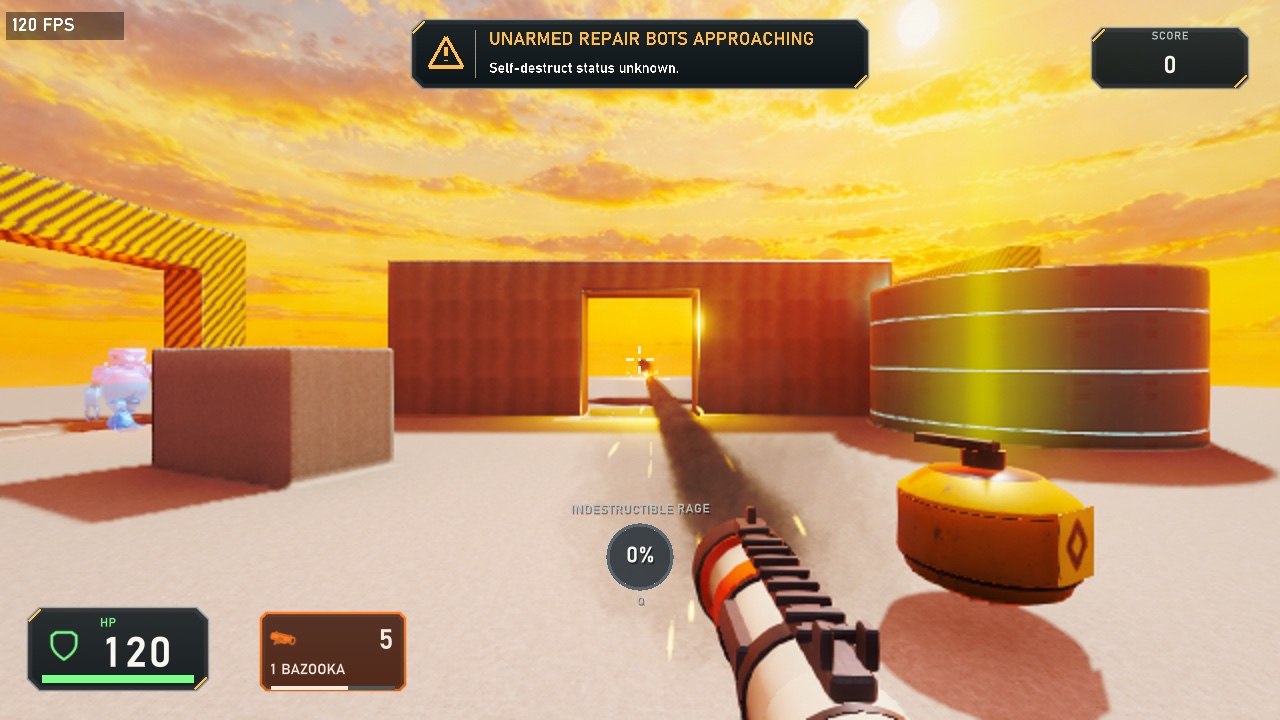
Spillway
A small arena built from nine brushes, four built-in materials, a fluid tank and two enemy gates. The complete map is shown below and included in the source download.
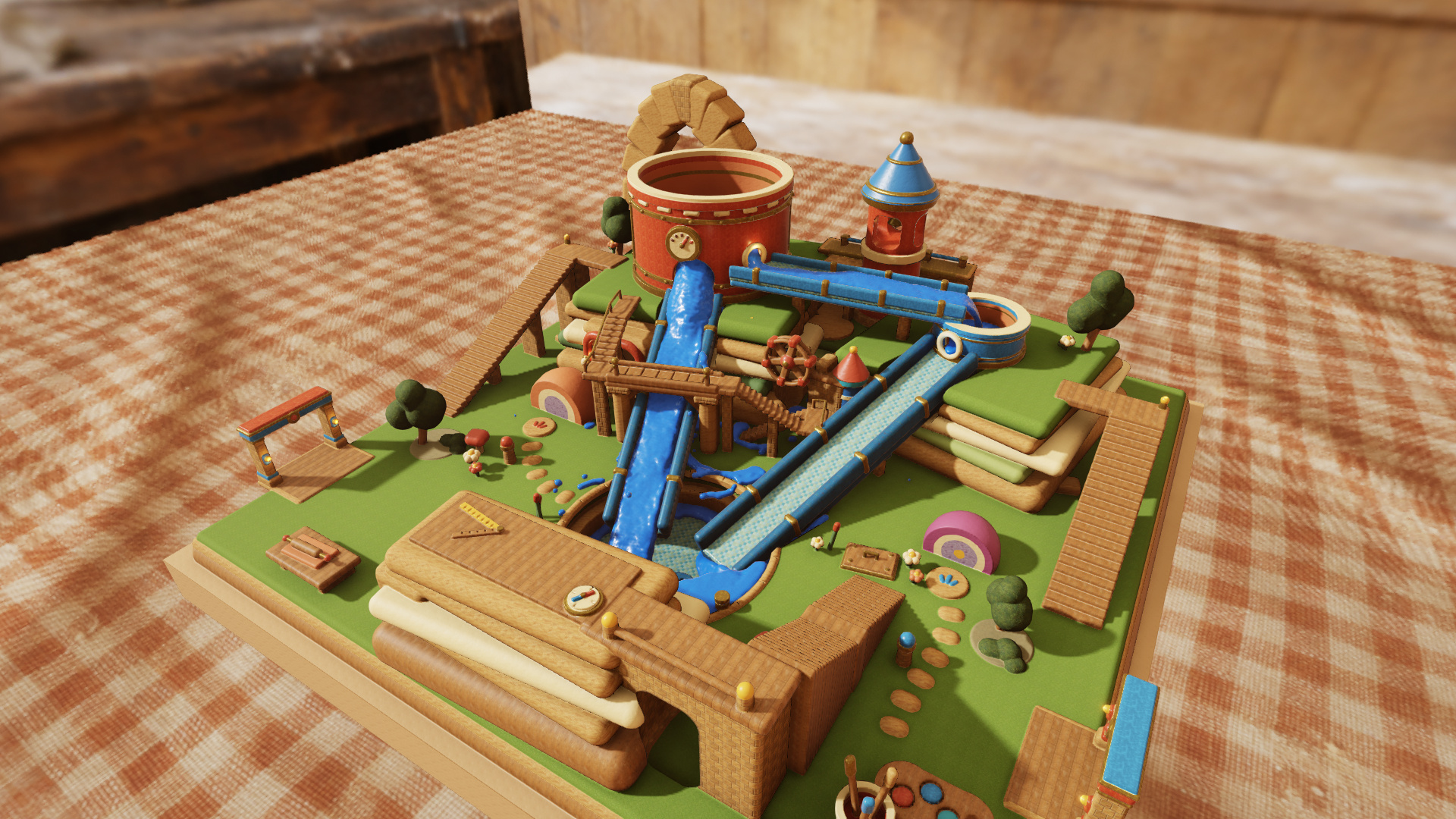
Tumblebrook
The Claybook-inspired example takes the same format further: layered clay terrain, custom materials, a pressurized cistern, flowing water, lit caves and a final laser boss.
01 / Edit & play
Your first map
- Extract the example. Download Spillway into a new folder, such as
MySpillway. Open that folder:level.jsonandpreview.jpgshould be directly inside it. - Play it once. In PETAFAB, open Workshop → My Levels → Play Folder and select that folder. You can also open the download directly with Play Local ZIP.
- Make a small edit. Open
level.jsonin a text editor. Try one of the changes below, save the file, then return to Workshop and choose Play Folder again. Each launch reads your edits from disk; restarting the current run uses the already-loaded map. - Tune the look. While playing your local map, press F8 to adjust lighting, fog, bloom and sun settings. Choose Save JSON and look for SAVED LOCALLY. If you edited the file externally, reopen the map before saving from F8.
Try these changes
- More bots: change both
countvalues in the first wave from3to5. Each gate will send five constructors. - Harmless fluid: set
fluidDamagePerSecondto0. The liquid still flows and pushes actors. - A different wall: change the wall’s
builtinfromsteeltofactory:steel. - Explore in peace: set
wavesto[]. With no waves or boss, the map becomes a free-exploration space.
The included JSON Schema provides field hints and validation in compatible editors. Keep it next to level.json. Use valid JSON: double-quoted names, commas between entries, and no comments or trailing commas. Local testing earns no Workshop trophies or campaign progress.
02 / Build the arena
How a level works
Maps use version: 2. The required fields are version, materials, player, brushes, fluids, gates and waves. Empty arrays are valid. Field names are case-sensitive; unknown and duplicate fields are rejected.
Position, scale and direction
Positions are [x, y, z] in metres, with Y pointing up. Terrain covers X/Z from −32 to +32 and Y from 0 to 32. Every map begins with a destructible concrete slab whose top is at Y = 4. The player position is the lower capsule center, so a Y coordinate of 4.55 places the player on that slab. Leave headroom and put an ammo pickup nearby: the player starts unarmed.
Yaw is in degrees: 0 faces +Z and 90 faces +X. Simulation timing uses 120 ticks per second: 60 ticks is half a second.
Add shapes, then cut into them
The brushes array runs in order. An add brush creates solid terrain with a declared material; a subtract brush cuts terrain that already exists. Spillway first adds a wall, then cuts its doorway. It makes the tank in the same way: add a cylinder, then subtract a smaller cylinder to hollow it out.
| Shape | Dimensions |
|---|---|
box | center and full size: [width, height, depth]. Optional yaw, pitch and corner rounding. |
sphere | center and radius. |
cylinder | center, radius and full height. Use topRadius to taper it; zero makes a cone. |
torus | center, centerline radius and tubeRadius. Optional pitch and yaw. |
Materials, fluid and light
Each material has a map-local id, which brushes reference. Start with built-in names such as concrete, steel, teal and hazard. Prefix a name with yard:, factory: or rooftop: to choose that campaign palette. The game has 32 physical material slots shared by terrain, foam and bot remains; Spillway uses 11.
Fluid volumes seed the liquid; brushes form the vessel that contains it. A fluid cylinder uses bottom, radius and height. A pipe uses start, end and radius. Keep the whole fluid volume inside the terrain bounds. Breach the tank and the liquid spills.
sun sets directional lighting, lights adds point lights, and render controls the image’s appearance. You can adjust these in the file or use F8 while playing your own map.
Gates and enemy waves
A gate is a spawn volume, separate from its visible terrain frame. Give it a unique id, a floor position at the bottom center of its rear face, full size, and a yaw pointing into the arena. Build a clear floor and exit; keep the entire volume inside X/Z ±31.75 and Y 0…32. Maps support up to four gates and 32 waves.
Each wave contains one to four groups. A group names its gate, enemy, count, and either intervalTicks or intervalSeconds. Enemy types are constructor, runner, rocketeer and shock_trooper.
A new wave waits for earlier groups to finish spawning and for the cumulative afterDefeats threshold. If omitted, that threshold is all enemies in earlier waves. afterSeconds adds a minimum time since the previous wave’s last spawn; delayTicks adds a further delay once the conditions are met.
In Spillway, each gate sends three constructors at half-second intervals. Once all six have arrived and four have been defeated, a 180-tick delay passes, then two runners enter from the west. Clear all eight enemies to win.
For a final encounter, add a top-level boss with a type of barrage, saw or laser and a body-center position. Defeating the boss wins the map. Set announcement: "none" on an individual wave or boss to silence its arrival banner, alarm and voice; boss music still plays.
03 / The complete example
Spillway, in one file.
This is the complete, editable level.json from the ZIP. Geometry is defined by the brushes; materials, sky and bots are supplied by PETAFAB. No separate models or textures are needed for this example.
{
  "$schema": "./level.schema.json",
  "version": 2,
  "fluidDamagePerSecond": 40,
  "materials": [
    {"id": "wall", "builtin": "steel"},
    {"id": "tank", "builtin": "teal"},
    {"id": "gate", "builtin": "hazard"},
    {"id": "plinth", "builtin": "concrete"}
  ],
  "botMaterials": {"constructor": {"robot_joint": "wall"}, "runner": {"robot_joint": "wall"}},
  "player": {"position": [0, 4.55, -11], "yaw": 0},
  "sun": {"direction": [0.4, 0.72, 0.6], "radiance": [5.5, 4.7, 3.9], "ambient": 2},
  "render": {"exposure": 1.15, "contrast": 0.05, "saturation": 0.12, "bloom_strength": 0.65, "fog_density": 0.003},
  "lights": [
    {"position": [-11, 6.5, 0], "radius": 8, "radiance": [20, 4, 0.5]},
    {"position": [11, 6.5, 9], "radius": 8, "radiance": [1, 6, 20]},
    {"position": [8, 7.4, 0], "radius": 5, "radiance": [0.6, 9, 6]}
  ],
  "pickups": [
    {"kind": "ammo", "position": [0, 4.55, -10]},
    {"kind": "grenade", "position": [2, 4.55, -8]}
  ],
  "brushes": [
    {"op": "add", "shape": "box", "center": [0, 6, 3], "size": [13, 4, 1.5], "material": "wall"},
    {"op": "subtract", "shape": "box", "center": [0, 5.5, 3], "size": [3, 3.5, 3]},
    {"op": "add", "shape": "cylinder", "center": [8, 5.5, 0], "radius": 2.8, "height": 3, "material": "tank"},
    {"op": "subtract", "shape": "cylinder", "center": [8, 6.1, 0], "radius": 2.3, "height": 3.2},
    {"op": "add", "shape": "box", "center": [-12, 6.5, 0], "size": [1, 5, 8], "material": "gate"},
    {"op": "subtract", "shape": "box", "center": [-12, 5.8, 0], "size": [2, 4, 5]},
    {"op": "add", "shape": "box", "center": [12, 6.5, 9], "size": [1, 5, 8], "material": "gate"},
    {"op": "subtract", "shape": "box", "center": [12, 5.8, 9], "size": [2, 4, 5]},
    {"op": "add", "shape": "box", "center": [-5, 4.8, -4], "size": [3, 1.6, 1.4], "yaw": 25, "material": "plinth"}
  ],
  "fluids": [
    {"shape": "cylinder", "bottom": [8, 4.6, 0], "radius": 2, "height": 2}
  ],
  "gates": [
    {"id": "west", "floor": [-12, 4, 0], "size": [4, 4, 4], "yaw": 90},
    {"id": "east", "floor": [12, 4, 9], "size": [4, 4, 4], "yaw": -90}
  ],
  "waves": [
    {"delayTicks": 120, "groups": [
      {"gate": "west", "enemy": "constructor", "count": 3, "intervalTicks": 60},
      {"gate": "east", "enemy": "constructor", "count": 3, "intervalTicks": 60}
    ]},
    {"afterDefeats": 4, "delayTicks": 180, "groups": [
      {"gate": "west", "enemy": "runner", "count": 2, "intervalTicks": 90}
    ]}
  ]
}
04 / Go further
Custom materials & skies
Once your layout plays well, materials can reference your own cooked DDS textures instead of built-in names. Keep those files inside the map folder and use relative paths with forward slashes, such as textures/stone_color.dds.
- Surface textures: pair a 1024 × 1024 BC7 sRGB color DDS with a BC5 linear tangent-space normal DDS. Both need 11 mip levels and tile once per metre. Material declarations use
colorandnormalpaths, with optionalroughness,metallicandemission. - Fluid: a top-level
fluidMaterialcan supply its own color/normal pair and surface settings.fluidDamagePerSecondcontrols damage independently. - Sky:
skyboxtakes three unsigned BC6H cubemaps:sky(1024² per face, 11 mips),diffuse(16², one mip), andspecular(256², seven mips).
Put editable images and author notes under source/; keep all runtime DDS files outside that folder. Tumblebrook uses custom clay and water materials, layered brush geometry and room lighting to build its waterworks. The schema reference documents the available fields and ranges.
05 / Share your map
Publish to Steam Workshop
- Test your saved map. Open it with Play Folder or Play Local ZIP. Check the spawn, ammo, paths out of both gates, fluid behavior and victory condition.
- Add a thumbnail. Save a JPEG named
preview.jpg, smaller than 1 MiB, besidelevel.json. Use a picture of your edited map. If you make a ZIP manually, put both files at its root, not inside another folder, and preserve referenced DDS paths. - Create the listing. Choose Workshop → My Levels → New Level and select your folder or ZIP. The last local map you played is preselected. Enter a title, description and any tags or change note.
- Choose what to share. Leave Skip source/ folder checked for a playable upload. Uncheck it to include your editable assets and notes. Folder uploads gather the JSON, referenced DDS files and thumbnail automatically.
- Upload and make it public. Open Read Steam Terms, accept the terms for this submission, then choose Upload New Item. New items start Private. Finish any agreement acceptance on the Steam item page, test the published copy, and set its visibility to Public when ready. Keep Steam running until the upload finishes.
Update the same item
Open your existing map’s Community → Update, choose the revised folder or ZIP, and select Update Level. This keeps the item and its subscribers together. For a listing-only edit, clear the selected folder or ZIP to keep the existing content and thumbnail.
Package limits & common fixes
- Folder not recognized: select the folder containing
level.json, not its parent. For a ZIP, keeplevel.jsonandpreview.jpgat the archive root. - JSON rejected: check editor errors, spelling, required fields and references to material or gate IDs. The game also validates geometry and resource budgets.
- Edits not showing: save in your editor, return to Workshop, and reopen the folder. Restarting the current run does not reload external edits.
- Missing textures: include every referenced DDS at the exact relative path. Required runtime files must be outside
source/. - Upload limits: 128 MiB for both the ZIP and expanded contents, at most 128 entries, 32 MiB of JSON, and 69 DDS files. Use ordinary stored or deflated ZIP entries with printable ASCII relative names; avoid encrypted files, links and duplicate names.